
CoachSuit blog
Published June 22, 2026
How to Structure Workout Programs for Online Coaching
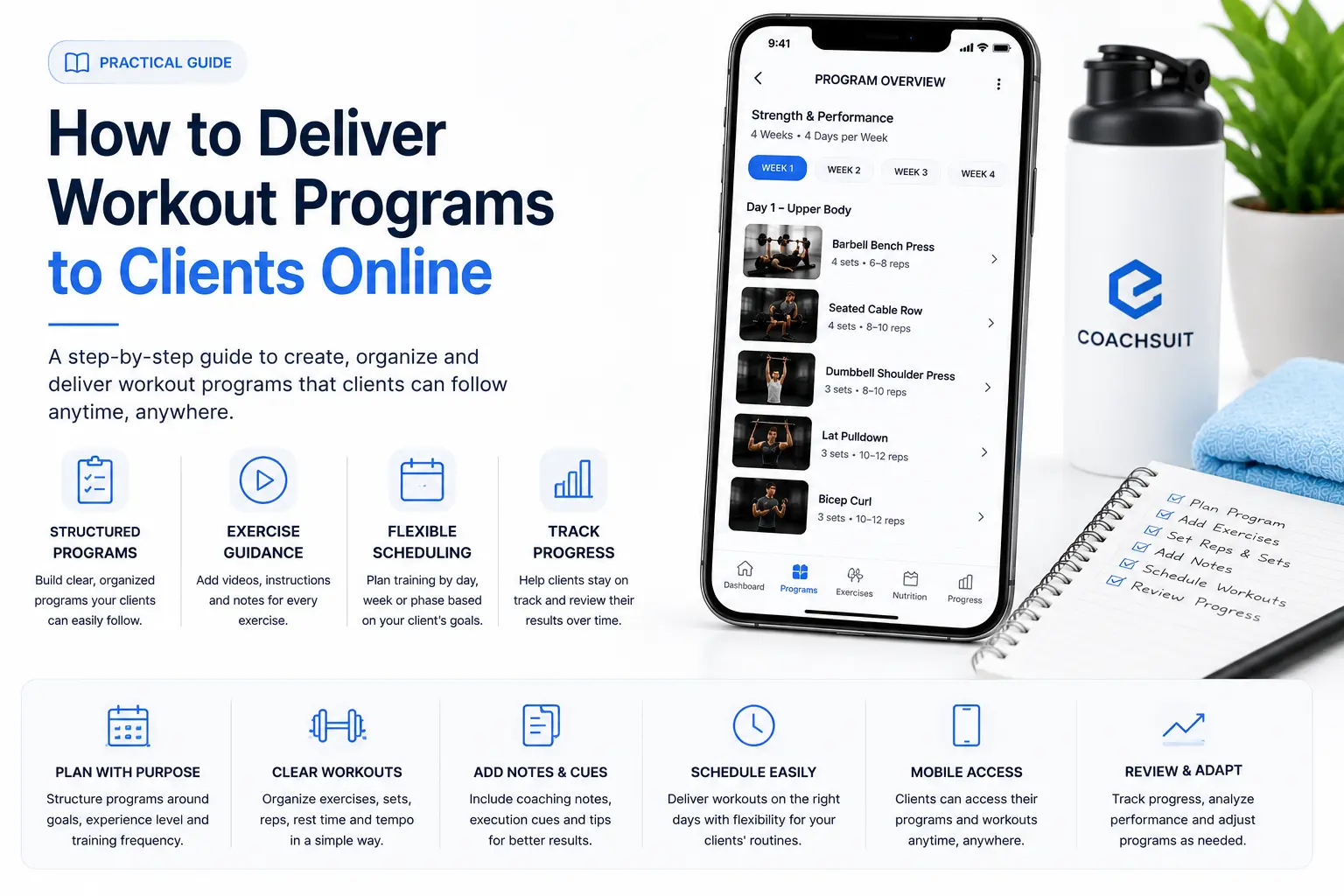
Online clients train without you in the room. They open a workout on their phone, scan the exercises and try to follow the plan between sets, equipment changes and daily distractions. When the workout program structure is unclear, even good programming becomes hard to follow.
Many coaches focus on exercise selection first and leave structure as an afterthought. The result is workout plans for clients that look complete on paper but feel confusing in practice. Clients are not sure which session is today, what order to follow or how hard each set should feel.
Strong online coaching workout programs are built around clarity. Weekly structure, workout names, exercise order, training notes and progression should work together so the client always knows what to do next.
This guide explains how to structure workout programs for online coaching, from program design and weekly layout to exercise order, notes, progression and review.
Why workout program structure matters in online coaching
In-person coaching gives you real-time cues, quick corrections and the ability to guide session flow on the spot. Online coaching removes that layer. The program itself has to carry more of the coaching logic.
Workout program structure is what turns a list of exercises into a plan clients can follow. It answers practical questions before the client has to ask you: which workout is today, how long the session should take, what comes first, what load to use and how this week connects to last week.
When structure is weak, clients hesitate, skip parts of the session or message you for clarification. That creates friction for both sides and makes coaching feel less professional than it should.
Good structure supports consistency. Clients who understand the plan are more likely to complete sessions, log progress and stay engaged between check-ins. For broader delivery context, see Best Way to Deliver Workout Programs to Clients Online. This article focuses on how to design the program itself.
Start with the program goal and training split
Before you write individual workouts, define what the program is trying to achieve and how the week is divided. A strength block, fat loss phase, return-to-training plan and general fitness program all need different structures.
The training split should match the client's schedule, experience and equipment. A client who can train four days per week needs a different layout than someone with two sessions and one home workout.
Common splits include full body two to three times per week, upper and lower four days per week, push-pull-legs, and hybrid models that mix strength and conditioning. The best split is the one the client can repeat consistently.
Write the split in plain language at the top of the program. Example: four training days per week, upper-lower-upper-lower, with optional walking on rest days. That single line gives clients context before they open day one.
If you are building a broader coaching workflow, an online coaching platform can help keep program structure, exercise guidance and client progress connected in one place.
Build a clear weekly structure
Weekly structure is the backbone of online coaching workout programs. Clients should be able to open the plan and immediately see how the week is organized.
Each day should have a clear label, such as Day 1: Upper Body Strength or Week 2, Workout B: Lower Body. Avoid vague names like Workout 3 or Session A unless you also explain what those labels mean somewhere visible.
Group workouts by week when you run phased programs. Week 1, Week 2 and Week 3 create a natural rhythm and make progression easier to explain. For rolling programs without fixed end dates, use clear workout names that repeat on a schedule the client understands.
Rest days matter too. Mark them explicitly so clients do not wonder whether they missed a session. A simple Rest day or Active recovery walk note removes guesswork.
Keep the weekly view scannable on mobile. Clients often review workout plans for clients on their phone before they enter the gym. Short names, consistent formatting and logical order reduce confusion.
Name workouts so clients know what to do
Workout names should describe the session in one glance. Strong names answer what type of training it is and what area or focus it covers.
Useful examples include Full Body A, Lower Body Strength, Upper Push, Conditioning Circuit, Home Dumbbell Workout and Deload Lower Body. Weak examples include Leg day thing, Hard workout, Coach special and Friday session.
If you use letters or numbers, keep the system consistent across the program. If Workout A always means full body and Workout B always means conditioning, say that once at the program level so new clients are not left guessing.
Match workout names to the exercises inside. A session labeled Upper Push should not suddenly include heavy squats unless you explain why the structure changed.
Organize each workout into clear blocks
A single workout should read like a sequence, not a random exercise list. Most sessions benefit from simple blocks that guide warm-up, main work, accessories and finishers.
A practical structure might look like this: warm-up, primary strength movement, secondary strength or skill work, accessories, optional conditioning and cool-down. Not every session needs every block, but the pattern should feel familiar.
Use headings or spacing between blocks so clients can pause between phases. When everything runs together, clients may rush through warm-up exercises or treat accessory work as optional even when it matters.
Keep block names simple. Warm-up, Main lifts, Accessories and Finisher are easier to follow than internal coaching codes clients have never seen.
Structured workout program delivery works best when each session is organized the same way across the program. Consistency builds habit.
Order exercises for clarity and flow
Exercise order affects both performance and client experience. Online clients often train in busy gyms or small home spaces, so order should minimize unnecessary equipment changes and confusion.
Place demanding compound movements early when they are the priority. Clients are fresher at the start of the session and can focus on technique when it matters most.
Group exercises by equipment when possible. Pairing dumbbell movements back-to-back before moving to cables reduces setup friction and helps clients keep momentum.
Alternate push and pull, or upper and lower, when you use supersets or circuits so clients understand the rhythm. Label pairs clearly: A1 and A2, or Superset 1, so they know exercises belong together.
Finish with lower-skill accessories or conditioning when appropriate. Clients should not wonder why a heavy deadlift appears after fatiguing isolation work unless you explain the intent in a note.
For exercise references and naming consistency, see How to Organize an Exercise Library for Online Coaching.
Write training notes clients can actually use
Training notes are where online coaching replaces some of the cues you would give in person. Good notes are short, specific and tied to the exercise or session they support.
Useful notes answer practical questions: setup reminder, tempo, rest target, effort level, substitution rule or what to do if equipment is busy. Avoid long paragraphs clients will not read between sets.
Session-level notes can explain the goal of the day, expected duration or how hard the client should push. Exercise-level notes should focus on execution, common mistakes or loading guidance.
Write in client-friendly language. Replace coach shorthand with clear instructions. Instead of stay tight and drive, write brace your core and push the floor away on each rep.
Notes support understanding and consistency. They do not replace professional assessment, injury screening or live form feedback when a client needs it.
- Session note example: Today is a moderate effort day. Leave one to two reps in reserve on main lifts.
- Exercise note example: Use a bench angle around 30 degrees. Lower under control for two seconds.
- Substitution note example: If the squat rack is busy, use goblet squats for the same sets and reps.
- Progress note example: If you hit all reps with good form last week, add 2.5 kg this week.
Define sets, reps, tempo and rest clearly
Clients need more than exercise names. Each movement should include the prescription in a format they can follow without decoding your system.
Use consistent notation across the program. If you write 3 x 8, stick with that style instead of mixing 3x8, 3 sets of 8 and eight reps for three sets in different workouts.
Add effort guidance when possible. Reps alone do not tell the full story. Phrases like two reps in reserve, stop before form breaks down or use a weight that feels challenging but controlled help remote clients load appropriately.
Tempo and rest belong in the plan when they matter. A note like 3-second lowering phase or rest 90 seconds between sets removes ambiguity and keeps sessions on track.
If you use RPE or percentage-based loading, explain the system once at the program level. Clients should not have to search old messages to remember what RPE 7 means in your coaching.
Plan progression across weeks
Progression is a core part of workout program structure. Clients need to see how this week builds on the last one, not just receive a new list of exercises every Monday.
Simple progression models work well online: add reps before load, add load when rep targets are met, increase sets gradually, reduce rest over time or move from simpler to harder exercise variations.
Write progression rules into the program so clients know what to do when they succeed. Example: when you complete 3 sets of 10 with the same weight, increase load by the smallest available increment next week.
Deload weeks should be planned, not accidental. If week four is lighter, label it clearly and explain why. Clients who do not understand deloads may think the program got too easy or that they did something wrong.
Avoid changing everything at once. Keeping some exercise continuity across phases helps clients track progress and reduces the feeling that they are starting from zero every month.
Progression notes support training decisions. They do not guarantee results on their own. Sleep, stress, nutrition and individual recovery still matter.
Review progress and adjust the program
Structure does not end when the program is sent. Online coaching workout programs stay useful when you review client data and adjust with intention.
Build review points into your coaching rhythm. Weekly check-ins, biweekly program reviews or phase reviews every four to six weeks all work depending on your offer.
Look at completed workouts, logged weights, missed sessions, repeated questions and client feedback. Patterns tell you whether the structure is too dense, too vague or mismatched to the client's schedule.
Adjust one or two variables at a time when possible: volume, exercise selection, progression speed or session length. Large rewrites can confuse clients who were finally getting comfortable with the current layout.
When you update a program, tell the client what changed and why. A short note like swapped barbell rows for chest-supported rows to reduce lower back fatigue on leg days helps clients trust the plan.
Recorded client progress tracking makes review easier because you can see training history instead of relying on memory or scattered screenshots.
Keep mobile readability in mind
Most clients will follow workout plans for clients on a phone screen. Structure that works in a spreadsheet may still fail if it is hard to read on mobile.
Use short exercise names, clear line breaks and consistent formatting. Avoid wide tables or dense blocks of text that require zooming and sideways scrolling.
One workout should fit on a screen flow the client can move through exercise by exercise. If a session feels overwhelming before they start, compliance often drops.
Workout program delivery tools matter here, but design comes first. Even the best app cannot fix a program that is poorly organized at the content level. Once structure is clear, a fitness coaching app can present it in a more client-friendly flow.
Common workout program structure mistakes
Most structure problems are fixable without rewriting the entire program. Coaches often have solid exercises arranged in a way that confuses remote clients.
Avoid these common issues when you structure workout programs for online coaching:
- Using vague workout names that do not describe the session
- Listing exercises without sets, reps or effort guidance
- Changing exercise order randomly between similar workouts
- Hiding progression rules in coach-only notes
- Overloading sessions with too many movements
- Skipping warm-up or cool-down structure without explaining why
- Writing long notes clients cannot read during training
- Updating programs without telling clients what changed
- Using inconsistent naming across weeks and phases
- Building programs for desktop view only, not mobile use
Workout program structure checklist
Use this checklist when you build a new program or audit one that clients struggle to follow.
- Define the program goal and training split
- Lay out the weekly structure clearly
- Name each workout in plain language
- Organize sessions into warm-up, main work and accessories
- Order exercises for flow and equipment use
- Add sets, reps, tempo and rest where needed
- Write short practical training notes
- Include progression rules across weeks
- Plan review points and deloads
- Check readability on mobile
- Connect exercises to clear guidance where possible
- Explain updates when the program changes
What to include in a structured online coaching workout program
Use this table as a quick reference when you review program structure or plan a new client block. Each element supports a clearer client experience.
Where CoachSuit fits
CoachSuit is built for trainers, online coaches and gyms that want a branded mobile app experience for client delivery. Depending on selected modules, CoachSuit can support structured workout programs, exercise guidance and recorded progress inside one client journey.
That matters because program structure only works when clients can follow it easily. A clear weekly layout, exercise order and training notes are easier to use when they live inside a fitness coaching app instead of scattered files.
CoachSuit can also support an exercise library with video instructions, recipes, meals and recorded progress depending on selected modules. The app can be personalized around the coach's or gym's logo, colors and visual identity, with iOS and Android publishing support, initial design personalization and launch support.
It may not be necessary for someone testing a very small offer with a single static plan. A simple document can work early on, but structure becomes harder to maintain as clients, phases and variations grow.
To explore whether CoachSuit fits your model, see CoachSuit for personal trainers, CoachSuit for gyms, workout programs, white-label fitness app branding, pricing and launch options or book a free demo.
For related reading, see How to Organize an Exercise Library for Online Coaching and Fitness App for Online Coaches: What to Look For.
Final takeaway
The best online coaching workout programs are easy to follow without you in the room. Clear weekly structure, sensible exercise order, practical notes and planned progression turn programming into a coaching experience clients can use on their own.
Start with the goal and split, then build each session in a consistent format. Review client progress, adjust with intention and keep mobile readability in mind from the start.
Structure is not a formatting detail. It is part of how clients succeed remotely. Whether you use documents, spreadsheets or an app for personal trainers, the program should always answer the next question before the client has to ask it.
Workout program structure for online coaching FAQ
- How should I structure workout programs for online coaching?
- Start with a clear goal and training split, lay out the weekly structure, name workouts in plain language, organize each session into blocks, order exercises logically, add sets and reps with effort guidance, write short training notes and plan progression across weeks.
- What makes a workout program easy for clients to follow online?
- Clients follow programs more easily when they can see the weekly plan, understand workout names, move through exercises in a logical order, read short notes and know how to progress without messaging the coach for every detail.
- How many exercises should one online workout include?
- There is no single perfect number. Most clients follow sessions better when the workout is focused rather than overloaded. Prioritize the main movements, keep accessories purposeful and avoid so many exercises that the session feels crowded on mobile.
- How do I plan progression in online coaching workout programs?
- Use simple rules clients can apply, such as adding load when rep targets are met, increasing reps before weight or progressing exercise difficulty over a phase. Write those rules in the program and review client logs during check-ins.
- How often should I review and update client programs?
- That depends on your coaching model. Many online coaches review programs weekly or biweekly for feedback and every four to six weeks for larger structure changes. Adjust based on client progress, missed sessions and repeated questions.
- Can CoachSuit support structured workout programs?
- Yes. Depending on selected modules, CoachSuit can support structured workout programs, exercise guidance and recorded progress inside a branded mobile app experience.
Want to structure workout programs inside a branded coaching app?
Book a free CoachSuit demo to discuss your coaching model, program structure, app modules, branding direction and launch options.
Book a free demo