
CoachSuit blog
Published June 21, 2026
How to Organize an Exercise Library for Online Coaching
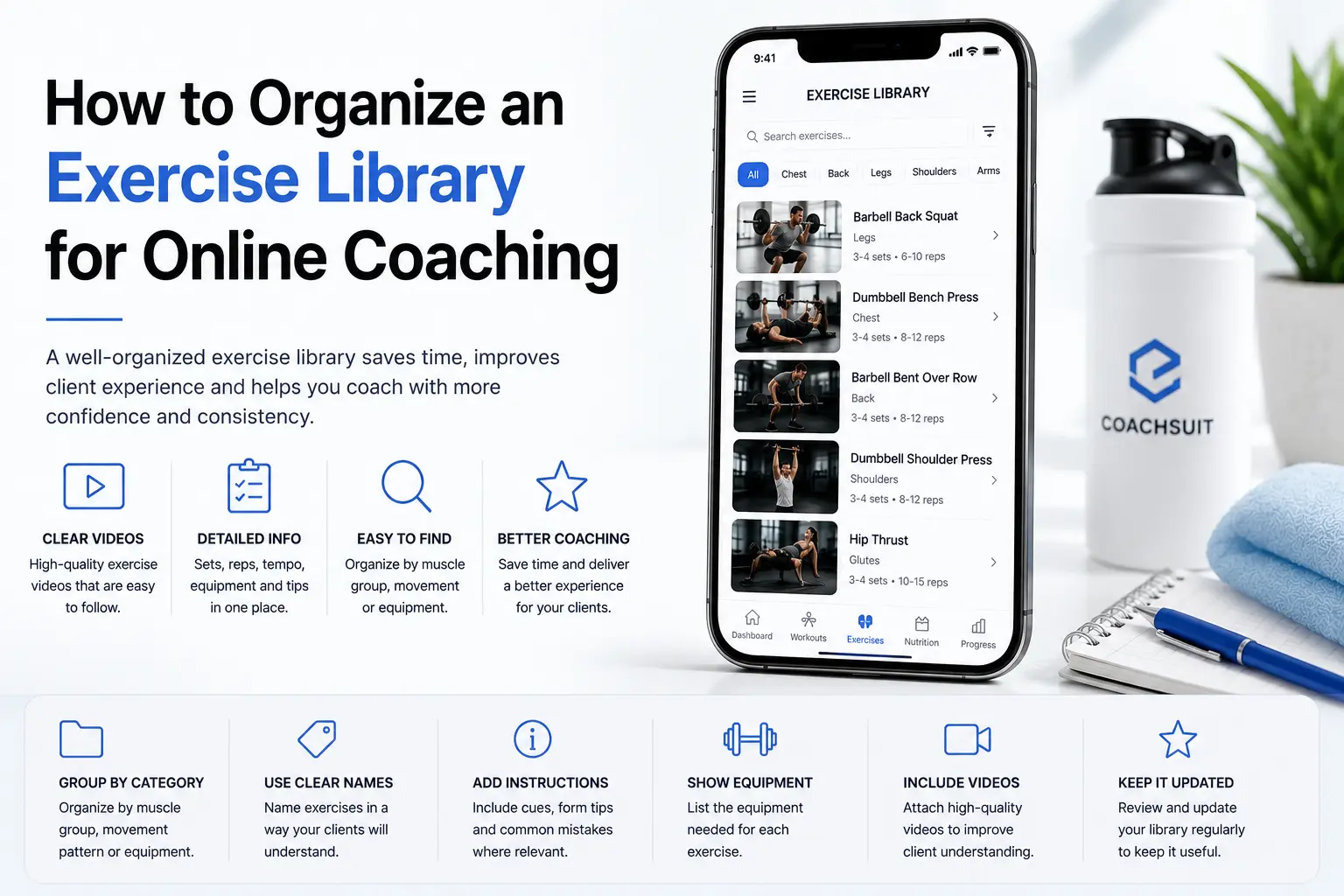
Exercise guidance is one of the biggest parts of online coaching. Clients train on their own, often without you in the room, and they need clear references when they forget setup details, tempo cues or which variation you assigned.
When exercise videos, notes and equipment details are scattered across folders, messages and old program files, clients get confused. Coaches repeat the same explanations, and programs become harder to follow than they should be.
A well-organized exercise library saves time for you and makes programs easier for clients to follow. Instead of hunting for the right video link every week, you build a structured online coaching exercise library that supports how you actually coach.
This guide explains how to organize an exercise library for online coaching, from categories and naming to video instructions, equipment details and keeping the library connected to your programs.
Why an exercise library matters in online coaching
Online clients often train without the coach beside them. They may be at home, in a busy gym or traveling with limited equipment. Exercise names alone may not be enough when a client needs a reminder about foot placement, grip width or which variation belongs in today's session.
An exercise library gives clients a place to revisit guidance when they need it. It also helps coaches reuse exercises consistently across programs instead of rebuilding instructions from scratch every time they write a new block.
The goal is not to create the biggest exercise database on the internet. The most useful library is the one that matches your coaching style and the movements your clients actually perform.
Good exercise video guidance supports understanding and consistency. It does not replace in-person coaching, live form correction or professional assessment of individual limitations.
If you are building a broader digital coaching workflow, see how an online coaching platform connects programs, guidance and client experience in one place.
Start with the exercises your clients actually use
Do not start by adding hundreds of random exercises because a software template makes it easy. Start with the movements used in your current programs and the variations you assign most often.
Prioritize exercises that appear frequently in your coaching. Add new variations only when they solve a real programming need, not because you found a new movement video online.
Most coaches begin with core lifts, accessory exercises and beginner-friendly movements that match their client base. From there, add gym-based movements, home-based movements, bodyweight variations and equipment-specific variations as your programs require them.
A smaller accurate library is better than a large messy one. Clients benefit from clarity, not volume. If you are still choosing delivery tools, Fitness App for Online Coaches covers what to look for when exercise guidance needs to live inside a client app.
Group exercises by category
Exercise categories make the library easier to browse and manage. When you build a program, categories help you find movements quickly instead of scrolling through an unstructured list.
Common category options include upper body, lower body, full body, core, warm-up, mobility, conditioning, strength, bodyweight, machine exercises, dumbbell exercises, barbell exercises and resistance band exercises.
The exact categories should match your training style. A strength coach may organize heavily by equipment and lift type. A general fitness coach may lean more toward training goals and session structure.
Keep category names simple and consistent. If you use both "upper body" and "push day" in different places, browsing becomes harder for you and for clients who explore the library on their own.
Use muscle groups and movement patterns
Categories are useful, but movement patterns make programming easier. When you think in patterns, you can balance sessions, spot gaps and swap exercises without rewriting the whole program.
Common movement patterns include squat, hinge, push, pull, lunge, carry, rotation, anti-rotation and core stability. Muscle groups such as chest, back, shoulders, arms, glutes, hamstrings, quads, calves and core add another useful layer for organization.
Coaches can use muscle groups, movement patterns or both depending on how they build programs. A hypertrophy-focused coach may tag by muscle group. A functional strength coach may tag primarily by pattern.
Tags do not need to be perfect on day one. Start with the system you already use when you write programs on paper or in spreadsheets, then refine as your library grows.
Name exercises clearly
Exercise names should be easy for clients to understand. Avoid internal shorthand that only you recognize, such as nicknames from your own training history or gym-specific slang.
Keep naming consistent across the app, programs and any written materials you share. If the library says "Barbell Back Squat" but the program says "BB squat," clients may wonder whether those are the same movement.
If an exercise has variations, the variation should be visible in the name. Equipment, angle and position all matter when clients compare what they see in the library with what is written in today's workout.
- Clear names: Dumbbell Bench Press, Barbell Back Squat, Seated Cable Row, Bodyweight Reverse Lunge, Resistance Band Face Pull, Incline Dumbbell Press, Kettlebell Romanian Deadlift
- Unclear names: DB press thing, Squat variation 2, Back pull, Coach special finisher
Include the right exercise details
Each exercise should include enough detail to be useful without overwhelming the client. The right level of instruction depends on the movement and your client base, but a few core fields should be consistent across the library.
Recommended details include exercise name, target area or category, equipment needed, video instruction, a short written description, setup notes, execution cues, common mistakes where relevant, alternatives or regressions where relevant and progression notes where relevant.
Written exercise instructions add context that video alone may not cover, such as tempo, rest preferences or how the movement fits into the session. Keep cues short and practical.
Exercise notes support understanding and consistency. They do not guarantee safety, injury prevention or perfect technique on their own. Clients still need appropriate loading, rest and coaching support based on their situation.
Keep videos short, clear and easy to follow
Exercise videos should help clients understand the movement quickly. They should be easy to open near the workout, not buried in a separate folder the client has to search while standing between sets.
Avoid overly long videos unless the exercise genuinely needs more explanation. Most clients want a clear demonstration, not a full lecture before every set.
Consistent camera angle, lighting and framing help the library feel professional. Show the full movement, keep the body visible and avoid distracting backgrounds that make it hard to see foot position or bar path.
Record common exercises first, use consistent naming and attach each video to the correct exercise entry. A strong exercise video library is organized around client use, not around how many files you uploaded.
For a wider view of how guidance fits into delivery, see Best Way to Deliver Workout Programs to Clients Online.
Connect the exercise library to workout programs
The library should not sit separately from the program. The most useful exercise guidance appears close to the workout, where the client is already focused on today's session.
When a client opens a workout, they should be able to access exercise instructions from that screen. This creates a smoother client experience than sending random video links through messages or email.
Connected guidance reduces repeated questions and helps clients stay in the training flow. They tap the exercise, review the video or cues, and return to the session without leaving the program context.
Structured workout program delivery works best when exercises, sets, reps and guidance live in one organized client journey rather than across separate tools.
Organize by equipment for better client access
Equipment filters are useful when clients train in different places. A client who travels often may need bodyweight or band options. A gym-based client may need clear machine and cable guidance.
Common equipment tags include dumbbells, barbell, cable machine, resistance bands, kettlebells, machines, bodyweight, bench, pull-up bar, general gym equipment and home equipment.
This is especially useful for online coaches who serve both gym-based and home-based clients. Equipment tags help clients know what they need before they start warming up.
Equipment organization also helps you build alternatives faster. When a client reports missing gear, you can filter the library and choose a sensible swap without rebuilding the session from scratch.
Add alternatives and regressions carefully
Alternatives help when clients do not have equipment or need a simpler variation. Regressions and progressions should be clear, but you do not need to attach five options to every movement.
Do not overload the client with too many choices. The coach should decide which alternatives fit the program, the client's level and the equipment available that day.
Useful examples include Barbell Back Squat alternative: Goblet Squat, Pull-Up regression: Assisted Pull-Up, Barbell Romanian Deadlift alternative: Dumbbell Romanian Deadlift and Push-Up regression: Incline Push-Up.
When alternatives are linked inside the library, clients understand that the swap is intentional rather than a random substitute. That supports program trust and keeps digital fitness coaching organized as client needs change.
Keep your exercise library updated
An exercise library is not a one-time task. It grows with your coaching, and it needs maintenance the same way your programs do.
Regular maintenance includes removing duplicates, fixing unclear names, replacing poor videos, adding missing equipment details, updating instructions, reviewing frequently used exercises, removing exercises that no longer match your coaching style and keeping categories consistent.
A clean library saves time when building programs later. You spend less energy searching, less time answering repeat questions and less effort fixing client confusion caused by outdated entries.
Schedule a simple quarterly review if your library is active. Even thirty minutes of cleanup can improve the client experience and make your next program build faster.
Common exercise library mistakes
Most exercise library problems are organizational, not technical. Coaches often have good content scattered in the wrong structure.
Avoid these common issues when you build or refine your online coaching exercise library:
- Adding too many exercises too early, which creates clutter before core movements are documented well
- Using inconsistent names across programs, folders and app entries
- Uploading videos without written instructions or equipment details
- Not showing required equipment, which leads to last-minute client confusion
- Creating duplicate exercise variations that differ only by filename
- Hiding videos away from workouts so clients never find them during sessions
- Making categories too complicated for clients to browse
- Not updating old content after your coaching style evolves
- Using coach-only language clients do not understand
- Treating the library as a video dump instead of a coaching tool
Exercise library checklist for online coaching
Use this checklist when you build a new library or audit an existing one. It keeps the work practical and focused on client experience.
- Start with exercises used in current programs
- Use clear exercise names
- Group exercises by category
- Add muscle group or movement pattern tags
- Add equipment details
- Include video instructions
- Add short written cues
- Keep videos close to workouts
- Add alternatives where useful
- Avoid duplicate exercises
- Review and update the library regularly
- Make the library easy for clients to search or browse
What to include in an online coaching exercise library
Use this table as a quick reference when you review exercise entries or plan what to document next. Each element supports a clearer client experience and a more efficient coaching workflow.
Where CoachSuit fits
CoachSuit is built for trainers, online coaches and gyms that want a branded mobile app experience for client delivery. Depending on selected modules, CoachSuit can support an exercise library with video instructions and connect that guidance to workouts and programs.
That connection matters for client experience. Instead of sending separate links, clients can open their program inside a fitness coaching app and access exercise guidance in a more organized mobile flow.
CoachSuit can also support workouts, programs, recipes, meals and recorded progress depending on selected modules. The app can be personalized around the coach's or gym's logo, colors and visual identity, with iOS and Android publishing support, initial design personalization and launch support.
It may not be necessary for someone who only needs a small private folder of exercise videos to test an early offer. A simple folder can work at the start, but it becomes harder to manage as programs, clients and variations grow.
To explore whether CoachSuit fits your model, see CoachSuit for personal trainers, CoachSuit for gyms, workout programs, white-label fitness app branding, pricing and launch options or book a free demo.
For related reading, see Personal Trainer App Features and Gym App Features Members Actually Use.
Final takeaway
A good exercise library is not just a video collection. It is a coaching system that helps clients understand workouts and helps coaches deliver programs consistently.
Start with the exercises you use most, name them clearly, add useful instructions and keep the library updated as your coaching evolves. Connect guidance to programs so clients do not have to hunt for help mid-session.
The best library is simple, organized and connected to the workout experience. Whether you use folders, spreadsheets or an app for personal trainers, structure should serve the client first.
Exercise library for online coaching FAQ
- What is an exercise library for online coaching?
- An exercise library is a structured collection of exercises with names, categories, videos, instructions and details that help clients understand how to perform movements inside their training programs.
- How should I organize an exercise library?
- Start with exercises you use often, group them by category, add muscle group or movement pattern tags, include equipment details, attach clear videos and write short instructions that clients can understand.
- Do I need videos for every exercise?
- Not always at the beginning. Start with the exercises your clients use most often. Over time, you can add videos for more movements, variations and alternatives.
- What makes an exercise video useful for clients?
- A useful exercise video is short, clear, easy to open and connected to the exercise inside the workout. It should show the movement clearly and be supported by simple written cues where needed.
- Can CoachSuit support an exercise library?
- Yes. Depending on selected modules, CoachSuit can support an exercise library with video instructions and connect that guidance to workouts and programs inside a branded mobile app experience.
- Should gyms also organize an exercise library?
- Yes. Gyms can use an exercise library to support member programs, onboarding, gym-based training plans and members who want to revisit exercise guidance outside direct coaching sessions.
Want to organize your exercise library inside a branded coaching app?
Book a free CoachSuit demo to discuss your coaching model, exercise library, app modules, branding direction and launch options.
Book a free demo