
CoachSuit blog
Published June 10, 2026
Personal Trainer App Features: What Coaches Actually Need
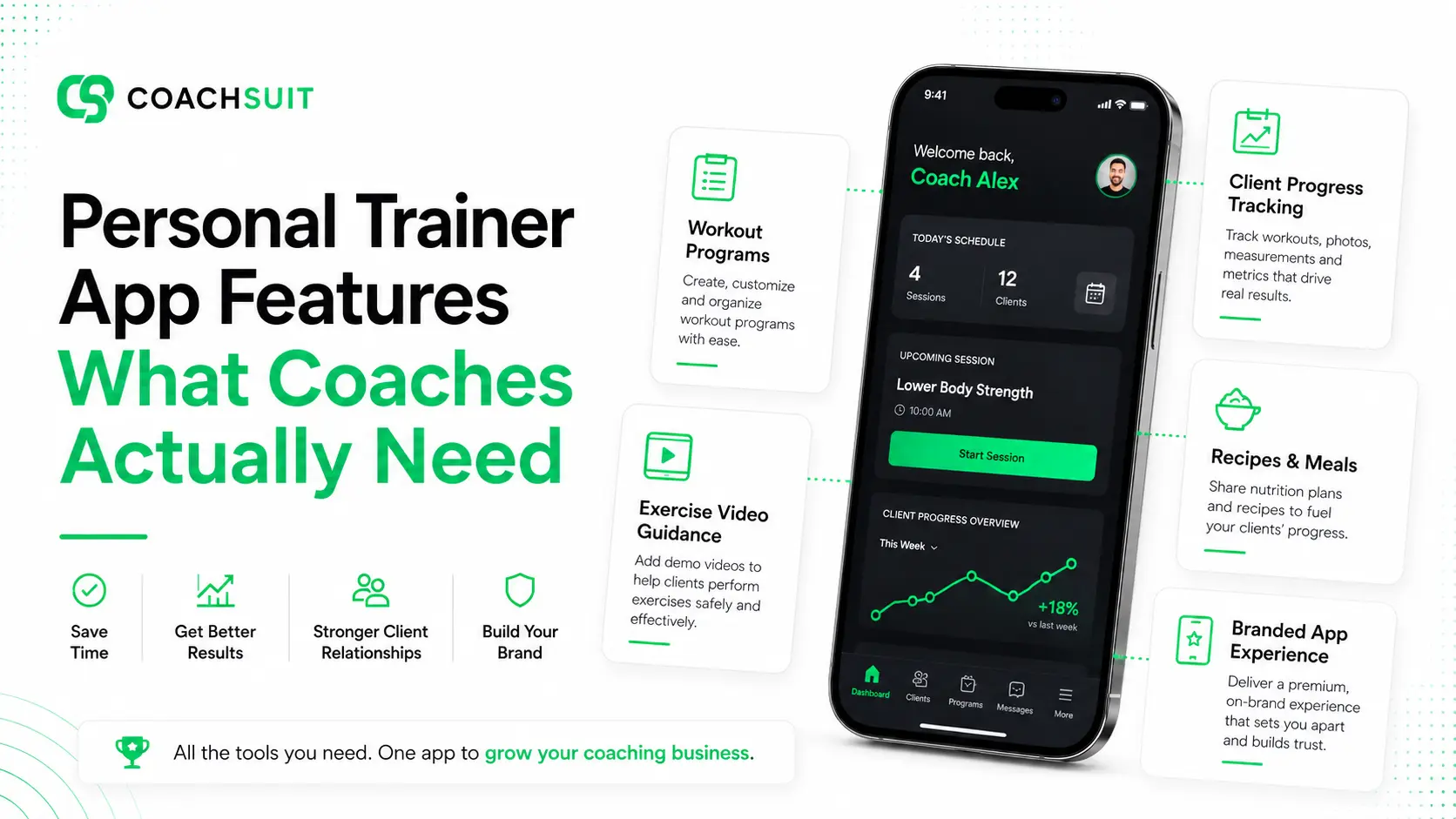
Many personal trainer apps look similar at first glance. Product pages list workouts, dashboards, libraries, analytics and client management tools until every option starts to feel like the same long checklist.
The real question is not how many personal trainer app features a platform includes. It is whether those features improve how you deliver coaching and how clients follow the program between sessions.
Coaches need tools that help clients understand what to do next, review exercise guidance when needed and stay connected to the training plan without searching through scattered files and messages.
This guide explains the most important personal trainer software features, how to evaluate them honestly and where they fit into different coaching models.
Why app features should start with the client experience
When trainers compare an app for personal trainers, they often start with admin tools and backend organization. Those matter, but clients experience the app on their phone in short sessions between work, family and training.
From the trainer side, you may care about organization, delivery efficiency and brand presentation. From the client side, the priority is simpler: knowing what to do next, how to perform the exercises and where to find supporting content.
The best fitness coaching app features make the coaching experience easier to follow. Workouts should be easy to open. Exercise guidance should be easy to find inside the session. Progress should connect back to the program instead of sitting in a separate dashboard clients never open.
Avoid choosing software only because it has many dashboards or a long marketing feature list. The app should support the coaching offer, not replace the coach. If you are still comparing delivery formats, How to Choose a Personal Trainer App covers evaluation steps without assuming you need every module on day one.
A useful personal trainer app starts with client clarity. A useful fitness mobile app keeps workouts, guidance and progress in a flow clients can actually use on a busy weekday.
Workout and program delivery
For most personal trainers and online coaches, workout and program delivery is the core feature. If clients cannot access training content clearly, other modules matter less.
Clients need structured access to workouts and programs, not just a file sent once and forgotten. A good workout program app helps organize sessions, program length, training frequency, exercise order, sets, reps and rest guidance in a way clients can follow from their phone.
Program delivery is different from sending a static PDF. Structured delivery keeps the plan active inside the app and helps clients navigate week to week.
Repeatable program templates can be valuable when you sell the same framework to multiple clients. Personalized delivery matters when you adapt sessions frequently. Either way, client-facing clarity should stay consistent.
Look for workout program delivery that makes the program easy to read session by session. Clients should understand the workout name, exercise order and basic session intent without asking you to resend content.
Exercise video guidance and instructions
Exercise names alone are often not enough, especially for clients training outside in-person sessions. Even experienced clients may need a reminder about setup or exercise intent when they open a session on their own.
Exercise video guidance and written instructions help clients understand what they are supposed to do without waiting for a reply in messages. This is especially important for online coaching, hybrid models and clients who travel or train in different gyms.
Guidance should be easy to find inside the workout flow. If clients have to leave the session and search a separate library, the feature creates friction instead of clarity.
Video and text work well together. Video helps clients see a movement example. Written instructions can cover setup, coaching cues, rest guidance or alternatives you want them to remember during the session.
Keep expectations realistic. Exercise video guidance supports understanding and consistency. It does not replace live form correction, injury prevention advice or medical safety guidance.
For a broader look at how structured guidance fits into delivery, see Online Coaching App vs PDFs and WhatsApp.
Client progress tracking
Coaches need a practical way to see or organize what clients have completed. Progress visibility can include training history, logged weight, completed workouts or recorded activity depending on the platform and your coaching model.
Progress tracking supports accountability and organization. It can make check-ins more useful because you and your client can review what happened between conversations. It does not guarantee results, retention or transformation on its own.
A useful progress feature should connect back to the training program, not exist as a disconnected dashboard. If clients cannot see their own consistency inside the same app where they train, the feature may feel separate from daily coaching.
Ask how progress appears on the client side and on your side as the coach. Some trainers need simple completion visibility. Others want logged weight or activity history they already discuss during reviews. Match the feature to your rhythm instead of adding tracking because it sounds advanced.
Practical client progress tracking should make the client journey easier to review, not harder to manage.
Nutrition content support
Not every trainer needs nutrition features inside the app. Some coaches focus entirely on training content and handle food conversations separately. Others include recipes, meal ideas or practical food guidance as part of the client experience.
If nutrition is part of your offer, the app should support the exact type of nutrition content you provide. That might mean recipes clients can browse, meal examples that match your coaching style or supporting food content that stays close to the training plan.
CoachSuit supports recipes and meals as nutrition content inside the app. It is not presented as meal plan generation, calorie tracking or macro tracking. That distinction matters if your offer is practical food guidance rather than detailed diet logging.
Adding nutrition modules you do not use can clutter the client experience. Leaving out nutrition content your clients expect can make the app feel incomplete. Start with your real scope, then choose software that matches it.
Branding and white-label experience
A generic app can deliver content. A branded app can make the experience feel more connected to the trainer's business through logo, colors and visual identity.
Branding matters more when you want a professional client-facing experience, sell premium coaching or rely on mobile delivery as a core part of the offer. Clients who pay for structured coaching often notice when the experience feels like a collection of third-party tools instead of an extension of your brand.
Be careful with terminology. White-label or branded does not automatically mean source code ownership, unlimited customization or full platform ownership. Branding usually refers to visual identity and client-facing presentation within the agreed scope.
If brand consistency is important to your business, review what a branded fitness app actually includes before you assume unlimited control. White-Label Fitness App for Trainers explains what the term usually means and what it does not.
Mobile usability
Clients will usually use the app on their phone. That sounds obvious, but many platforms look impressive in desktop demos and weaker in everyday mobile use.
The app should be easy to navigate. Workouts, guidance, recipes and progress should not be hidden behind confusing menus or buried under admin-style screens designed for the coach rather than the client.
Mobile usability matters because a feature is only useful if clients can actually use it. A clean client experience can be more valuable than a long list of advanced features clients never open.
Before you decide, imagine a new client opening the app for the first time on a busy weekday. Can they find today's workout quickly and review an exercise without getting lost?
Strong backend organization cannot compensate for weak mobile follow-through. Evaluate the client journey first, then review trainer tools.
iOS and Android availability
Trainers should check whether the app supports iOS and Android before assuming every client can access the same experience. Clients use different devices, and device support affects how inclusive your delivery feels.
Publishing support also matters because launching an app involves more than designing screens. App store requirements, review steps and ongoing maintenance are part of the real launch process, not just a final checkbox.
If mobile access is central to your coaching offer, confirm what publishing includes and what you are responsible for after launch. Some trainers want help with both stores. Others only need clarity about timelines and support.
CoachSuit supports publishing for iOS and Android, with launch support included as part of the setup process.
Setup, launch and support
Feature lists do not tell the full story. Trainers should also ask what happens after they choose the app: setup, branding, content preparation, launch support and ongoing maintenance.
Important questions include how much content you need ready before launch, whether initial design personalization is included, who handles app store publishing and what support is available when you want to update modules later.
The right app should have a clear launch process. Unclear timelines create frustration when you are preparing client content and onboarding new clients at the same time.
Review pricing and launch options with the same practical mindset you use for features. You can also book a free demo to discuss modules, branding direction and support before committing.
For CoachSuit, a typical launch takes 2-4 weeks depending on selected modules, content preparation and feedback speed. Ongoing maintenance and priority support are available through CoachSuit Club.
Features that sound useful but may not matter yet
Not every trainer needs every advanced feature on day one. Software marketing often highlights complex analytics, advanced automations, large admin dashboards and community tools that look impressive in screenshots.
Those features are not automatically bad. They may simply not be the highest priority for your current coaching model. A solo online coach selling structured programs has different needs than a gym with many staff members and internal workflows.
Examples of features that may not matter yet include complex analytics if you only review progress manually, advanced automations if your offer is still simple, large admin dashboards if you have a small client base and tools clients will not actually use.
Start with the features that support your current offer. You can add complexity later when your delivery model and client numbers justify it.
How to choose the right feature set for your coaching model
The best online coaching app features depend on how you coach, not on what looks most impressive in a product tour.
In-person trainers often need workout follow-through between sessions, exercise guidance clients can review on their own and progress visibility that supports check-ins. The app should extend the relationship between sessions rather than replace in-person coaching.
Online coaches usually need structured program delivery, exercise videos, a strong mobile client experience and progress tracking that supports remote follow-through. Clients may never meet you in person, so the app carries more of the delivery experience.
Hybrid coaches need both in-person support and app-based delivery. The feature set should work for clients who see you locally and still need organized follow-through during the week.
Program sellers often need repeatable programs, clear onboarding and a professional delivery experience that makes the purchase feel complete. Branding and mobile usability matter more here because the product experience is part of the offer.
If online delivery is a core part of your business, review how an online coaching platform supports your model before comparing secondary features.
Personal trainer app features by priority
Use this table as a practical starting point when you compare platforms. It focuses on features that usually affect client experience first.
Personal trainer app feature checklist
Use this checklist when you review product pages, talk to providers or compare personal trainer software features against your real coaching workflow.
- Workouts and programs
- Exercise video guidance
- Written instructions
- Client progress visibility
- Training history
- Recipes and meals if nutrition content is included
- Branded app experience
- Logo and color personalization
- iOS and Android support
- Clear mobile navigation
- Launch support
- Ongoing maintenance
- Pricing clarity
- Fit with your coaching model
Where CoachSuit fits
CoachSuit is built for trainers, online coaches and gyms that want a branded mobile app experience rather than scattered files and messages. Depending on selected modules, it can support workouts, programs, exercise guidance, recipes, meals and recorded progress inside one client-facing app.
It can help create a more structured mobile client experience than PDFs, email attachments and message threads alone. That can be useful when clients need a clear place to follow training, review guidance and stay connected to the program between sessions.
CoachSuit fits coaches who care about brand, delivery and client experience. CoachSuit for personal trainers and the wider online coaching platform direction focus on that use case.
It may not be necessary for someone who only needs a simple PDF workflow or a fully manual messaging setup. In those cases, a full branded app may be more than you need right now.
CoachSuit includes initial design personalization and launch support, with ongoing maintenance and priority support available through CoachSuit Club. Review pricing and launch options or book a free demo if you want to explore modules and branding direction without assuming a one-size-fits-all setup.
Final takeaway
The best personal trainer app features are the ones that support your coaching offer and improve the client experience. Start with workouts, guidance, progress, mobile usability and branding before chasing every advanced module on a pricing page.
Avoid choosing software only because it has the longest feature list. A shorter, clearer client experience often beats a complicated platform clients do not use consistently.
Choose the app that helps clients follow the program and helps you deliver coaching clearly. Compare options against your real workflow, then decide based on delivery needs rather than marketing language alone.
Personal trainer app features FAQ
- What features should a personal trainer app have?
- A personal trainer app should support the coach's delivery model. Important features usually include workouts and programs, exercise guidance, mobile usability, progress visibility, branding and clear launch support.
- Do personal trainers need exercise video guidance?
- Exercise video guidance is useful when clients train outside in-person sessions or need to revisit movement instructions. It helps organize guidance inside the app instead of repeating the same explanations in messages.
- Is progress tracking important in a coaching app?
- Progress tracking can be useful because it helps organize training history, logged activity and client progress visibility. It does not guarantee results, but it can support a clearer coaching experience.
- Should a trainer choose a branded app or a generic app?
- A generic app can work for basic delivery. A branded app makes more sense when the trainer wants the client experience to feel connected to their own logo, colors and coaching brand.
- Does CoachSuit include nutrition features?
- CoachSuit supports recipes and meals as nutrition content inside the app. It is not presented as a meal plan generator, calorie tracker or macro tracking tool.
- How long does it take to launch a CoachSuit app?
- A typical CoachSuit launch takes 2-4 weeks, depending on selected modules, content preparation and feedback speed.
Ready to explore a branded personal trainer app?
Book a free CoachSuit demo to discuss your coaching model, app modules, branding direction and launch options.
Book a free demo