
CoachSuit blog
Published August 4, 2026
Sending Workout Videos to Clients: How to Build a Scalable Video Coaching System
Text-based workout instructions often fail on the gym floor. A spreadsheet that tells someone to execute a Romanian deadlift leaves too much room for interpretation, which can lead to poor form, frustration and weaker results. Across industries, eighty-three percent of people prefer video over audio or text for learning and instructions, according to TechSmith's video statistics research.
Sending workout videos to clients closes that communication gap by delivering visual cues when the lifter needs them. Delivering those files through scattered text messages creates friction that makes it harder to charge premium rates and keep sessions flowing.
To build a scalable online coaching business, you need a unified delivery system. CoachSuit lets you consolidate programming into a white-labeled mobile app, turning instructional content into a reusable business asset. A structured exercise library upgrades your service from file sharing into an interactive digital coaching product.
Why sending workout videos builds a stronger coaching business
Visual demonstration replaces the need to stand next to every client and correct posture in person. Purely in-person training limits earning potential to the hours in your day, which is why many coaches shift toward hybrid models: you program the week, supervise one or two sessions and rely on digital delivery for the days you are absent.
Hybrid coaching can support higher program compliance and justify recurring monthly retainers when clients still feel coached between visits. A client watching a brief clip of your squat mechanics right before they step under the bar retains specific cues better than they would reading text alone.
Audit your roster for clients who miss in-person sessions and shift them toward a hybrid model using this digital framework. For busy executives who travel, set clear rules for workout logging on days they train alone in hotel gyms.
The cognitive advantage of visual instruction
Reading requires active interpretation. Between heavy sets, that extra mental load makes clients more likely to skip details. Watching a short video offers clearer instruction with less effort, which helps clients remember your coaching cues during the set.
Writing out a "3-1-X-1" tempo needs a lengthy explanation of eccentric descents and concentric pauses. A video showing a three-second descent makes the concept understandable in seconds. Without a visual reference, a novice lifter might pause at the top of a squat instead of the bottom and miss the intended stimulus.
Visual clarity also reduces back-and-forth messaging and saves administrative time each week. Open your most recent client program and count the steps required for that user to see correct form for a Bulgarian split squat. If it takes more than two taps, many clients will skip the instruction and guess.
The problem with traditional video delivery methods
The fitness industry previously relied on sending unlisted YouTube or Vimeo links via text message. That approach introduces friction because clicking an external link pulls the user out of your programming environment. Ads, recommendations and other creators can interrupt the session and pull attention away from the workout you designed.
Switching between a spreadsheet and a video player extends rest periods. Phone operating systems often kill background apps, so clients may need to reload their tracking sheet every time they return from the video. In basement gyms with poor cellular reception, streaming a raw file from a text message can stall the entire session.
These small frustrations compound. They break workout flow and lower the perceived value of your coaching, even when the programming itself is strong.
Protecting your intellectual property
Relying on shareable URLs weakens your business model. Texting a link hands over unrestricted access to premium content and makes it easy for clients to forward your instructional catalog for free. Once a URL escapes your control, unauthorized users can consume specialized programming without paying a retainer.
Housing media inside a dedicated native application reduces that risk by locking content behind secure user authentication so only paying subscribers can view your proprietary cues. Modern platforms can use tokenized access and encrypted hosting to make casual downloading harder than sending raw files.
Stop treating coaching cues as disposable chat attachments. Treat them as intellectual property that belongs inside your online coaching platform.
Reject generic stock footage
Pre-made stock video libraries save time initially but weaken brand authority over the long term. Silent generic models rarely build a relationship with a remote roster. Specialized fitness coaches earn seventy-eight percent more on average than generalist trainers, according to a Personal Trainer Development Center survey of over eight hundred coaches.
Putting your coaching philosophy on camera proves specialization. When a client sees you demonstrating the exact mechanics you programmed, they perceive higher value in the monthly fee. If a client has lower back pain, seeing their actual coach demonstrate a modified block pull builds trust that a faceless animated character cannot replicate.
Because sending workout videos to clients becomes a primary touchpoint, production quality reflects on your brand. Film your own library whenever the movement is central to your programming.
Design microlearning for the gym floor
Instructional content must match the consumption environment. A client resting for ninety seconds between sets cannot watch a five-minute biomechanics lecture. Design clips around microlearning: one technical standard, usually under sixty seconds.
Rather than relying on silent demonstrations, film proprietary clips where you verbally call out the most common errors. For a kettlebell swing, instruct the viewer to hinge at the hips rather than squatting the weight down, demonstrate the movement and let the client get back to work.
Short, specific cues beat long lectures for day-to-day training. Save deeper education for separate resources outside the between-set window.
Best practices for shooting high-quality demonstrations
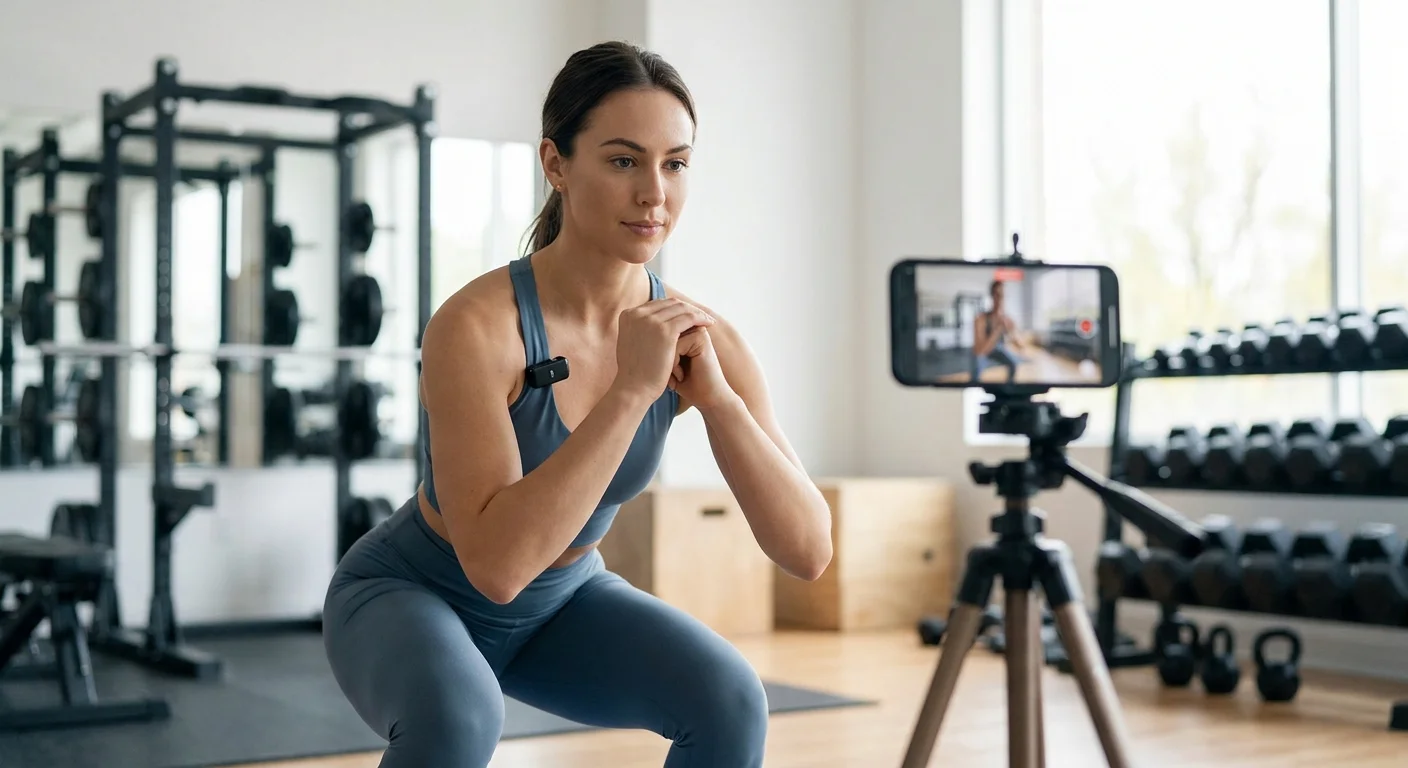
Keep every demonstration between thirty and forty-five seconds. Show two or three repetitions from a direct front angle, then two or three from a side profile to reveal spinal alignment and hip depth. Set your smartphone on a tripod at waist height to capture the full range of motion without distorting perspective.
Placing the camera on the floor can make the weight look heavier but obscures joint angles, which makes deadlift setup harder to understand. Frame the shot so your entire body stays visible at the top and bottom of the movement. Position yourself in a well-lit corner facing a window and avoid harsh overhead fluorescent lighting that casts heavy shadows across posture.
Clear audio outranks 4K visual resolution for remote instruction. Built-in smartphone microphones pick up ambient gym noise, so invest in a dedicated wireless lapel microphone such as the Rode Wireless GO or a DJI Mic to isolate your voice. Commercial gyms create acoustic challenges with echoing ceilings, clanking plates and background music that can trigger automated takedowns on some hosting services.
Never improvise the first few seconds. Write a short script for the opening of every clip so the viewer gets exact technical cues immediately. Skip self-introductions. The client already bought your program. Focus entirely on execution. Filming core movements in one location with consistent lighting and branded apparel creates a professional aesthetic when the files populate your exercise library.
Deliver media through a white-label app
Running a high-ticket coaching business through a desktop-first web portal usually means low engagement. Clients expect a native mobile experience. The global fitness app market is estimated at 12.44 billion dollars in 2026, driven by smartphone penetration that makes mobile delivery the default expectation.
Within fitness applications, exercise tracking often commands the highest usage, followed by nutrition monitoring and general activity tracking. Sending workout videos through a dedicated mobile environment lets you control pacing inside the workout. Compress files so they load on cellular networks when a client trains in a basement gym with poor reception.
Media should play inline without forcing full-screen landscape mode. CoachSuit handles backend formatting so clips can buffer on both iOS and Android devices inside a branded fitness mobile app.
The financial mechanics of software ownership
Successful online coaching operations often use tiered pricing, charging roughly two hundred to four hundred dollars per month depending on demographic and niche. A Google Sheet rarely justifies that price point. A white-labeled application with custom branding, logo and proprietary video hosting elevates perceived authority and makes high-ticket retainers easier to sell.
Many fitness software platforms charge perpetual, tiered monthly subscriptions that rise as your roster expands. CoachSuit uses a different model: a lifetime license after the initial build, so overhead stays flatter as you grow.
Use the comparison below as a planning lens for a roster around three hundred clients. Exact numbers vary by vendor and package, but the ownership difference is the strategic point. Review long-term pricing and how you scale your online coaching business when overhead stays more predictable year over year.
Transition with a progressive rollout
Recording hundreds of movements before launch paralyzes many trainers. Use a progressive rollout instead. Identify the fifty most frequently programmed movements in your current templates, focusing on primary squats, hinges, horizontal presses and vertical pulls.
A core library with goblet squats, Romanian deadlifts, push-ups and lat pulldowns covers most of a standard hypertrophy block. Launch the app with that proprietary library, temporarily supplement obscure accessory movements with standard instructional clips and schedule one hour a week to film about ten new exercises. Over the first six months, replace generic content with your own.
If a client needs a modification for a shoulder injury, film a quick custom alternative on the gym floor and upload it to their profile.
Phase out legacy communication channels
Migrating active clients requires clear, decisive communication. Use a four-week timeline to move your roster off spreadsheets and WhatsApp without creating unnecessary churn.
- Week one: Send a broadcast email announcing the app upgrade. Highlight the integrated video player and streamlined workout tracking, and explain how the new software removes the need to jump between a PDF and a browser mid-session.
- Week two: Distribute download links and login credentials. Ask clients to install the app and explore the interface. Monitor who has not activated an account and reach out personally.
- Week three: Run duplicate programming in both the old spreadsheet and the new app so clients can compare experiences. Keep a safety net for less tech-savvy clients who need more time to learn logging.
- Week four: Disable editing on legacy tracking sheets, move all upcoming programming into the app and archive old folders so reverting is no longer convenient.
Where CoachSuit fits
CoachSuit is built for personal trainers, online coaches and gyms that want a branded iOS and Android experience for workouts, progress tracking and a proprietary video library. Depending on selected modules, you can host exercise guidance next to programs instead of scattering links across chats.
A one-time build model turns delivery software into a longer-term business asset rather than another seat-based subscription that scales against your growth. Explore CoachSuit for personal trainers, workout programs, exercise library, pricing or book a free demo.
For related reading, see How to Organize an Exercise Library for Online Coaching, Best Way to Deliver Workout Programs to Clients Online and Online Coaching App vs PDFs and WhatsApp.
Final takeaway
Sending workout videos to clients works best when the clips are short, clear, branded and easy to open inside the workout itself. Text and scattered links leave too much room for misinterpretation and create friction on the gym floor.
Film a progressive proprietary library, protect your content behind authenticated delivery and migrate clients with a clear four-week plan instead of trying to rebuild everything overnight.
Stop renting every piece of digital infrastructure. A white-labeled iOS and Android app can deliver workouts, track progress and host your video library as a longer-term business asset. Own the delivery layer so growth does not automatically multiply software overhead.
Sending workout videos to clients FAQ
- Why send workout videos instead of text instructions?
- Video reduces interpretation errors on complex movements, improves cue retention between sets and lowers the back-and-forth messaging that consumes coaching time each week.
- How long should an exercise demonstration video be?
- Aim for thirty to forty-five seconds for most gym-floor demos, and keep instructional clips under about sixty seconds so clients can watch them during short rest periods.
- Should I use stock exercise videos or film my own?
- Stock footage can fill gaps early, but filming your own core movements builds brand authority and trust. Start with your fifty most programmed exercises and expand weekly.
- What is wrong with sending YouTube or WhatsApp video links?
- External links pull clients out of the workout flow, expose them to ads and recommendations, create buffering issues and make it easier for premium content to be shared outside paying clients.
- How do I migrate clients to a new app without churn?
- Use a four-week rollout: announce, distribute logins, run duplicate programming for one week, then disable legacy sheets and move all new programming into the app.
- Can CoachSuit host a proprietary exercise video library?
- Yes. Depending on selected modules, CoachSuit can support an exercise library with video instructions inside a branded mobile app connected to workouts and programs.
Ready to deliver workout videos inside your own branded app?
Book a free CoachSuit demo to discuss your exercise library, white-label app modules, branding direction and launch options.
Book a free demo